AI crawler logs on a HubSpot site: how to see which bots reach your pages
HubSpot doesn't share request logs, so HubSpot sites can't see GPTBot or ClaudeBot visits. How a Cloudflare zone in front fixes that, and the catches to plan for.
Teams on HubSpot CMS ask us a question we used to answer with a shrug: does ChatGPT's crawler actually reach our pricing page? On most stacks we would open the request logs and look. On HubSpot there are no logs to open. As Promptwatch's setup guide puts it, HubSpot serves sites from its own Cloudflare zone and doesn't share request logs.
So a HubSpot site owner can see the output side of AI search. Prompt tracking shows whether ChatGPT or Perplexity names the brand and cites its pages. What they can't see is the input side: whether GPTBot, OAI-SearchBot, ChatGPT-User, ClaudeBot, PerplexityBot and the rest ever fetch those pages, and what status code they get back.
Why the input side matters
When a page isn't cited, there are two very different explanations. Either the engines never read it, or they read it and preferred something else. The first is an access problem. The fix lives in robots.txt, firewall rules, redirects, or internal linking. The second is a content problem, and the fix is the page itself.
From the outside the two look the same: no citation. Teams without logs tend to assume the content problem, because that is the part they control, and rewrite a page that no bot has fetched in weeks. The opposite mistake happens too: someone loosens bot rules for a page that was being crawled all along and simply wasn't useful for the question.
Logs are how you tell them apart. A request, a user agent, a status code. With crawls and citations side by side you can see a citation rate per page, which is the number we lean on most. Crawled often and rarely cited points to content. Rarely crawled points to access or discovery. Our post on the crawl-to-citation path goes through that diagnosis in detail.
It also helps to know which bot you are looking at. Promptwatch's guide describes GPTBot as OpenAI's crawler for training its models, OAI-SearchBot as the bot ChatGPT search uses to surface websites, and ChatGPT-User as the agent for user actions in ChatGPT when it visits pages. Anthropic and Perplexity have the same split between crawlers and user fetches. A page that only GPTBot visits is in a different position from one that ChatGPT-User fetches while answering people. Our AI crawler bot names post lists the strings.
The fix: your own Cloudflare zone in front of HubSpot
Since HubSpot won't hand over its logs, the workaround is to put a layer you own in front of it. Promptwatch's guide calls the setup Origin-to-Origin (O2O): traffic hits your Cloudflare zone first, then forwards to HubSpot. Your zone sees every request, so your zone can log them.
Once traffic flows through your zone, there are two ways to get the logs into Promptwatch. A Cloudflare Worker sits on the route and reports each request. Per the guide, the Worker works on any Cloudflare plan, including Free. The guide's Worker script passes all traffic through untouched and logs HTML page views, sending each log in the background so the visitor is never kept waiting. The alternative is Logpush, Cloudflare's log export, pointed at Promptwatch's HTTP endpoint. Either way, Promptwatch identifies the AI crawlers and keeps only those visits. The rest of your traffic is discarded.
One thing to know before you plan the project: logs start flowing once setup is complete, and logs from before the setup can't be imported. Your baseline starts the day you finish. If a site relaunch or a big content push is coming, do this first.
Before you touch DNS
This is a DNS change on a live site, so a little preparation saves a bad afternoon. Check these before you start:
- Your domain's nameservers must be managed at Cloudflare.
- Find your HubSpot account ID (Hub ID, in the account menu at the top right of HubSpot) and your account's data center. The CNAME target depends on both.
- Look at how the root domain is set up. If it uses A records pointing to HubSpot, read the section on A records below before anything else.
- If your Cloudflare zone has a zone hold enabled, release it before adding the record. Otherwise HubSpot can't verify the hostname.
- Agree who owns the change. You need admin access in both HubSpot's domain settings and Cloudflare, and someone watching the site while DNS updates.
The setup, at the level of the guide
We won't copy every click here. The HubSpot + Cloudflare guide has the exact steps and the CNAME table. The shape is this.
In HubSpot, go to Settings > Website > Domains & URLs and connect your domain as a reverse proxy. Choose Primary or Secondary, and switch off the option to connect with HubSpot's built-in content delivery network. That last switch is the one people miss.
In Cloudflare, create a CNAME for your hostname pointing at HubSpot's sites-proxy target for your data center, and set it to Proxied (the orange cloud). The guide is specific that you use the sites-proxy target, not the group##.sites.hubspot.net CNAME from HubSpot's SSL pre-provisioning step.
Still in Cloudflare, add a Modify Request Header transform rule for the hostname. It sets X-HS-Public-Host to your domain and X-HubSpot-Trust-Forwarded-For to true.
Back in HubSpot, open the Edit menu next to the domain and run Verify Reverse Proxy Connection. Don't move on until it passes.
Then connect the logs. In Promptwatch's Crawler Logs setup, pick HubSpot + Cloudflare. Auto Deploy takes a Cloudflare API token with three permissions and deploys the Worker for you; the guide says the token is only used for that deployment and never stored. The Manual tab walks through creating the Worker yourself, and the Logpush tab covers the export route.
The catches
There are a few, and we'd rather you hear them now than halfway through.
Cloudflare plan
Cloudflare's own HubSpot guide doesn't list a plan requirement, but HubSpot's reverse proxy docs mention Cloudflare Enterprise for this setup. Promptwatch's guide is plain about what to do: if HubSpot's Verify Reverse Proxy Connection check fails on a non-Enterprise zone, contact support before continuing. Don't push on and hope.
A records on the root domain
DNS for this has to be a CNAME. A records can't be forwarded through Cloudflare Workers. If your root domain uses A records pointing to HubSpot, the guide connects the www hostname through Cloudflare and redirects the root domain to it. That means www becomes the address that bots and people end up on, so check your canonical tags and sitemap agree with it.
The www route
If the site is served on www, the Worker needs a route for www.example.com/. Auto Deploy only creates a route for the root domain (example.com/), so add a second route in Cloudflare under Workers Routes that points www to the same Worker. Skip this and the Worker is deployed but sees none of the www traffic.
The proxy toggle
If the record is set to DNS only (grey cloud), requests go straight to HubSpot and bypass both the Worker and Logpush. Check the orange cloud last, even if you set it first.
What to check in the first two weeks
When the first logs arrive, resist the urge to read totals. Look at a few specific things instead.
Start with hostnames. Since November 13 the Crawler Logs table has a Host column, and requests from a hostname that isn't your project website get a warning. After a root-to-www switch, this is the quickest way to confirm you are logging the site you think you are.
Then check who is real. Promptwatch's crawler logs verify visits against each operator's published IP ranges, so a script that calls itself GPTBot doesn't count as GPTBot. In the filter you can see which bots carry a Verified badge.
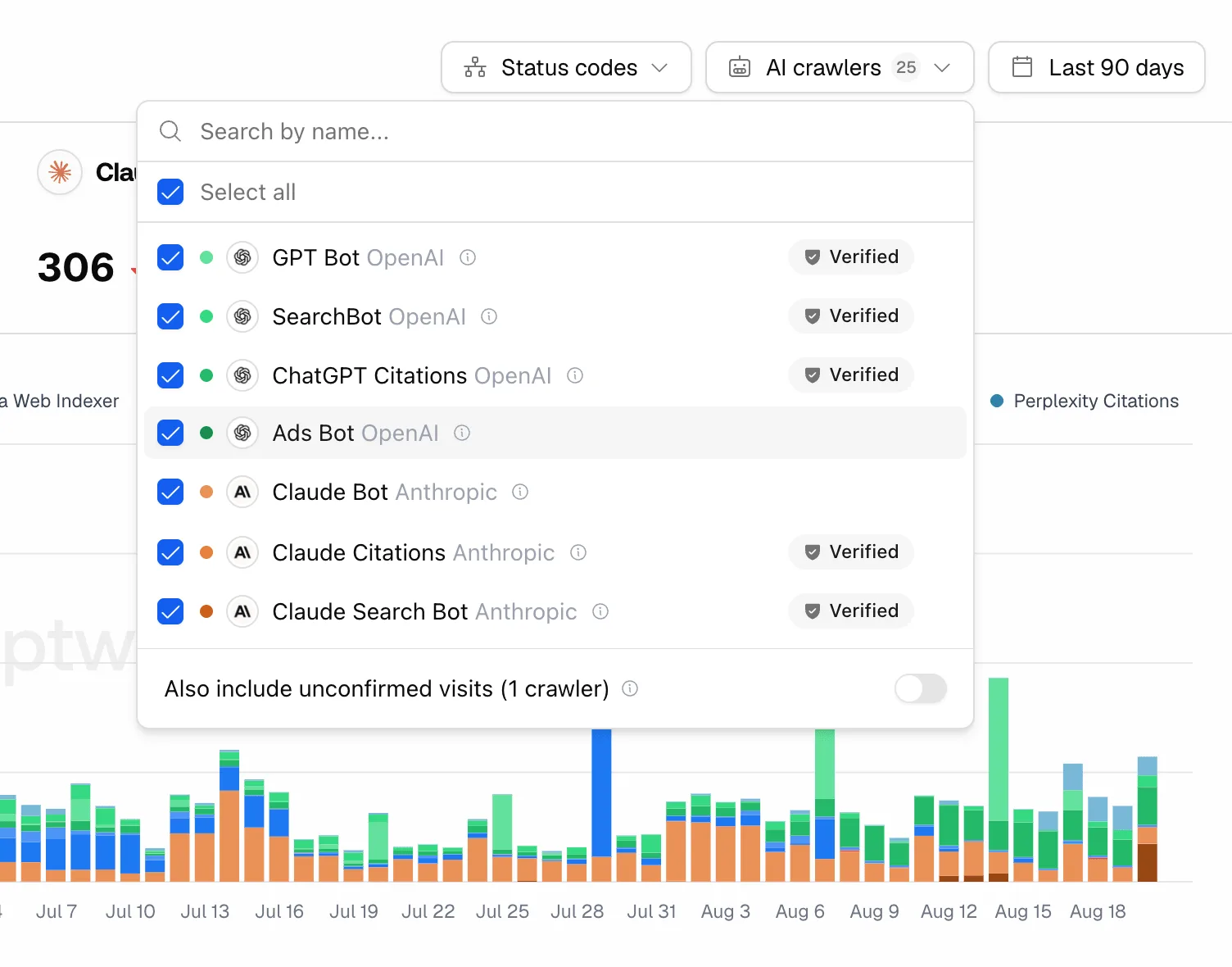 Promptwatch crawler logs with verified AI crawlers, from the Promptwatch changelog. Example project data.
Not every bot can be verified. Exa publishes no IP ranges, so its two crawlers show up without the badge. That is a property of the operator, not a sign your setup is broken.
Status codes come next. A cluster of errors for one bot on one path usually means a rule somewhere is turning it away. Promptwatch's error tracking adds a failure explanation, which saves a lot of guessing on a stack where the error might come from Cloudflare, from HubSpot, or from your own rules.
Split visits by job before you report them. Our post on reading indexer and user-fetch visits covers why the two numbers mean different things.
If no logs come in at all, open Agent Chat on the Crawler Logs page and ask why. Since November 6 it checks your setup status when no data is arriving, and it never sees your API key values. Then check the www route and the orange cloud.
Which plan this needs
Crawler logs aren't on every Promptwatch plan. On brand plans they start on Professional ($245 a month, 25M crawler logs) and Business ($579, 100M) includes more; Essential ($95) has none. Every agency plan includes them, from Kick-off at $199 a month with 10M. The self-serve plans all come with a 7-day free trial on monthly billing.
We use Promptwatch for this because the logs sit in the same project as the prompts and citations, which is what turns a list of bot visits into the access-or-content answer this post started with. If you run a HubSpot site and want to see who actually reads it, set up the Cloudflare zone, then start the 7-day trial on Professional or above and connect the logs. If you would rather have us look at the results with you, write to hello@visiblyrank.com.